
iPhone app
SpeedCam
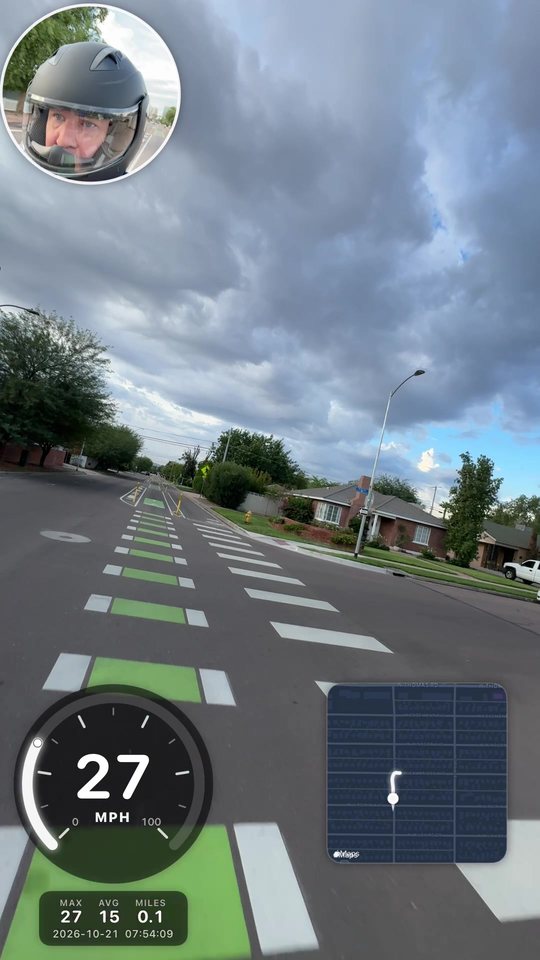
Record your ride with the speed, the map, and your face in the shot. Nothing to add in editing.
Requires iPhone with iOS 17 or later. Selfie-in-shot needs iPhone XS/XR or newer.
Speed in the video
Your speed is drawn into the saved footage, not just on screen. What you see while recording is what you get.
Route map
A live Apple Maps mini-map with your path since you started recording. Drag it anywhere and pinch to resize.
Selfie camera
Front and back cameras at once, with the selfie in a circle or rounded window inside the main shot.
7 badge styles
Classic, Tiles, Gauge, Bar, Minimal, Sport, and Retro, in six accent colors.
Move anything
Drag the speedometer, map, or selfie where you want them. Pinch to resize.
Pause, keep the trip
Pause the video while stats, route, and timer keep going. The pause is cut out of the clip.
Trips and stats
Max speed, average speed, and distance. Name each trip and review it with its full route map.
Built for your ride
Bike, EUC, E-Moto, Drive, and Race modes set the gauge scale and GPS tuning.
Split screen
Back camera and selfie top and bottom or side by side. You choose how much of the frame each gets.
Location style
For tours, hikes and travel: the place name and city instead of a speedometer.
Portrait or landscape
1080 × 1920 for Shorts and Reels, or 1920 × 1080 for YouTube.
Hands-free
Start and stop with the volume buttons, Siri, or the Action Button.
Made by a rider
I built SpeedCam because I wanted my speed in my ride videos without stitching overlays together afterward. It started on my own wheel in Phoenix, AZ.
Your location, video, and trips stay on your phone. See the privacy policy.
Good to know
- iPhone GPS updates about once a second, so the speed steps each second. Accuracy is typically within about 1 mph with a clear view of the sky.
- GPS isn't reliable in garages or tunnels.
- Don't operate the app while riding. Start recording before you go, and mount your phone securely.